Why Nobody Uses Your CRM (And What to Fix Before You Switch)
Why does nobody use your CRM?
Nobody uses your CRM because no one ever gave it a job. A CRM stores decisions a business has already made: who owns a client, what each stage means, and what happens when someone goes quiet. When those decisions live in your head, the CRM turns into a second place to type things, and everyone goes back to the place that already works.
Who is this for?
You run a business that already sells. You bought the CRM on purpose (GoHighLevel, HubSpot, Pipedrive, a board in Notion). It holds contacts, thousands maybe, and nobody trusts a word it says.
Around you there's a VA, a contractor, perhaps a part-time closer. You keep the real state of play in your own notes, because that's the version you believe. Every few months you open a comparison page for a different CRM and wonder whether that one would stick. Have this conversation before you move a single contact.
Key takeaways
- A CRM records decisions. If the decision was never made, the CRM has nothing to record.
- Pipeline stages that describe a feeling ("warm", "follow up") get skipped. Stages that describe a fact get updated.
- Every record needs one named owner. Shared ownership means nobody updates anything.
- The fields nobody fills are telling you something true about what the business actually tracks.
- Switching CRMs moves the same undecided questions into a cleaner interface, and the silence starts again about six weeks later.
- Fix the five checks below first. If they all pass and the thing still fights you, then replacing it is a real answer.
Table of contents
- Why the CRM keeps getting blamed
- What a CRM is actually holding for you
- The 5 checks before you replace your CRM
- What changes when a record has one owner
- When replacing it is the right call
- Frequently asked questions
- Recommended tools and resources
- Where to explore next
- Final summary
Why the CRM keeps getting blamed
The CRM is the easiest thing in the room to blame. It has a price, a login, and a comparison chart. You can replace it on a Tuesday and feel like something happened.
So the story becomes: the interface is clunky, the automations are fragile, the mobile app is slow. Sometimes that's true. It's also true of the next one.
What the blame hides is simpler. A CRM writes down answers. Who owns this client now. What "qualified" means in this business, this year. What we do when a proposal sits unopened for nine days. When those answers exist, typing them into software takes four seconds and everyone does it. When they don't, the person at the screen has to invent one, alone, at 6pm. So they close the tab and send you a message instead. That message is faster for them and expensive for you.
One figure worth holding lightly: Software Advice reports that 43% of businesses with a CRM in place use less than half of its features. Read it carefully. That's secondary reporting, the population is "businesses with a CRM" with no size breakdown, and it measures feature use rather than whether the CRM helps anyone. It says the pattern is common. It proves nothing about your business, and anyone selling you a migration on that number is overreaching.
What a CRM is actually holding for you
A CRM holds three things, and only three.
The first is state: where each client sits right now, in words everyone reads the same way. The second is ownership: whose name is on this record, and who moves it. The third is the exception: what happens when reality doesn't match the stage, because it won't, roughly a quarter of the time.
Most businesses buy the software for the first one and never write the second and third. Then they watch the first one rot, because state without an owner is a rumour.
Try this right now. Open your CRM and read your pipeline stages out loud, in order. For each stage, say who moves a client into it, and what has to be true before they do. If you can't do that for even one stage, you've found why nobody updates it. That gap has a name in how I work: the role was never designed, so the software inherited a question instead of an answer. I've written separately about naming the roles in a small business before you buy anything, because this is the same failure wearing a different coat.
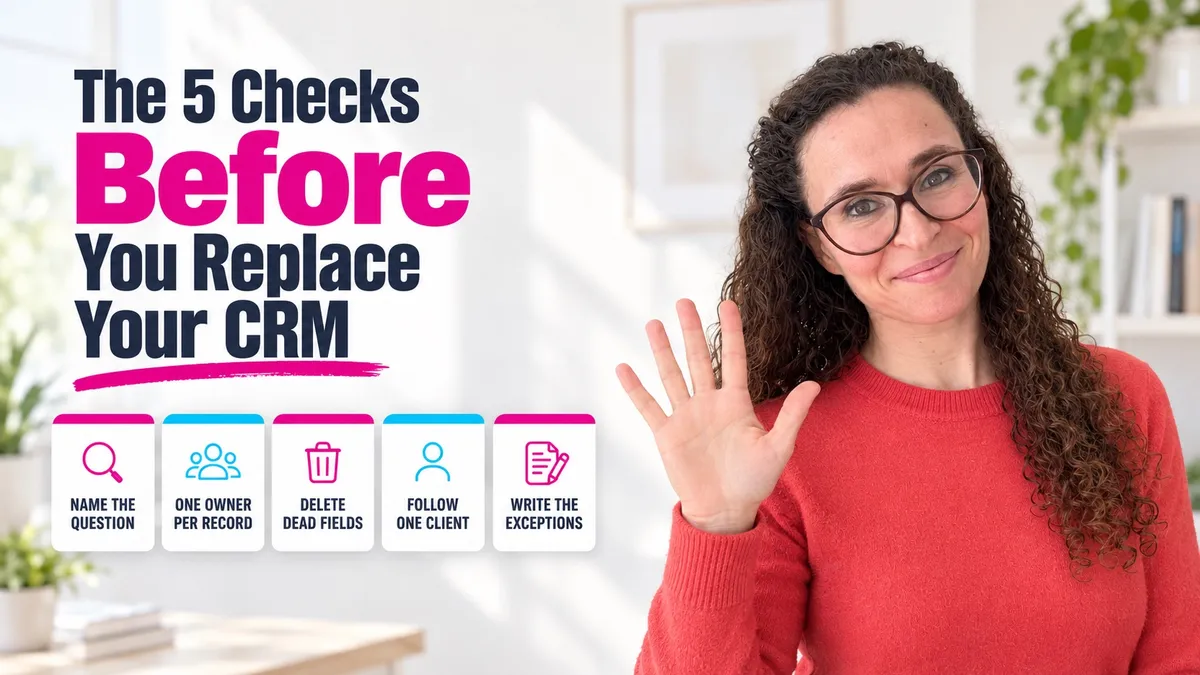
The 5 checks before you replace your CRM
Run these in order, on the CRM you already own. They take an afternoon.
Step 1: Name the one question it answers
Write one sentence: "I open this to find out ______." Not five things. One.
For most founders selling a service it's "who is waiting on me, and since when". With a sales team it might be "which deals close this month". With long delivery, "which client is stuck, and on what".
Once you have that sentence, most of the dashboard becomes decoration. Leave it for now. You're establishing what this thing is for, so the next four checks have something to point at.
Step 2: Give every record one owner
Open ten records at random and find the field that says who owns each one. Not "assigned to" left over from an import. The person who would notice if that client went silent for two weeks.
If that field is missing, or empty on six of the ten, stop. No new CRM ships with it filled in. Ownership gets decided in a conversation, then typed into software afterwards.
Step 3: Count the fields nobody fills
Export a view with every custom field. Sort by how many records have them empty.
The empty ones are honest. They're telling you that nobody, including you, has ever needed that field to make a decision. A few you'll start filling. Most you'll delete, and the form will get short enough that people finish it.
A short form that gets completed beats a thorough one that gets abandoned. Obvious, and still worth counting your intake fields today.
Step 4: Follow one real client end to end
Pick a client who signed in the last month. Walk their record from first contact to today, in the CRM only, with your own notes closed.
Watch where the trail goes cold. It's usually the same three places: the handoff from conversation to proposal, the handoff from sold to delivery, and the moment someone went quiet. All three are points where your business passes work from one pair of hands to another with the rules unwritten. I've covered the client-facing one in detail in how to hand over a client relationship without losing the client.
Step 5: Decide what happens when it's wrong
The stage says "proposal sent". The client called yesterday and asked for a different scope. What does the person holding that record do?
Write the answer down. One line per common exception, four or five in total. Almost everyone skips this check, and it decides whether anyone trusts the system a month from now. A record that can't express reality gets abandoned quietly, and after that the CRM only ever shows you a past that never quite happened.
This is the layer a working session surfaces fast, and it's most of what we look at in The Studio: what the piece you're pointing at is actually sitting on top of, and which decision underneath it was never made.
What changes when a record has one owner
Here's the before and after, as concretely as I can put it. Treat it as one worked example, not as a promise about your numbers.
Before. Stage: "Follow up". Owner: blank. Last activity: 23 days ago. Nobody is wrong, because nobody was ever responsible. You find it during a Sunday review, feel a small drop in your stomach, and send the message yourself. Your VA sees you do it and learns that you handle the real ones.
After. Stage: "Proposal sent, waiting on client". Owner: Marine. Rule: three working days of silence and Marine sends the nudge, seven days and she books a call in your calendar. You never open the record. On Friday you read a list and see two names that need you.
Same software, same contacts. Three decisions moved out of your head into a place where someone else can act on them.
I watched this land in a client session in April 2026. Her account held 56,102 contacts, a pipeline nobody could read, and billing charges she couldn't explain. She was ready to leave the platform. In one session we fixed the email authentication that was quietly killing deliverability, cut the pipeline to six stages that described facts, and synced her calendar properly. She kept the CRM. The missing piece had never been in the software.
When replacing it is the right call
Sometimes it is. Three cases, honestly.
The platform can't hold your business model. You sell retainers, it understands one-off deals, and the workaround has three moving parts. No amount of naming roles fixes that.
The cost has drifted past what you use. You run the checks, delete two thirds of the fields, and find you're paying enterprise pricing for a contact list and a calendar. Move.
Or the data is genuinely unrecoverable, corrupted by imports nobody supervised, and cleaning it costs more than a clean instance.
Notice what's missing from that list. "The team doesn't like it." "It feels clunky." "Everyone online uses the other one." Those feelings usually survive a migration intact, which is an expensive way to learn what they were about.
Frequently asked questions
Why does nobody use the CRM I paid for?
Because the decisions it records were never made. Stage names, record ownership and exception rules live in the founder's head, so anyone else opening it has to guess, and guessing is slower than messaging you.
Is it worth switching CRMs if nobody uses the current one?
Not until you've run the five checks above. A migration carries the same undecided questions into a cleaner interface, and the same silence returns within a couple of months. Switch when the platform genuinely can't hold your business model.
How do I get my team to actually update the CRM?
Give every record a named owner, rename stages so they describe facts instead of feelings, and write down what to do when reality doesn't match the stage. People update systems they can be right in.
What's the right number of pipeline stages for a small business?
Few enough to name from memory. Five or six suits most service businesses. If two stages call for the same action from the same person, they're one stage.
Should a solo business owner even have a CRM?
Yes, if you're regularly forgetting who's waiting on you. No, if a spreadsheet and your calendar already answer that. The test is the question in Step 1, not the size of the business.
What's the difference between a CRM problem and a process problem?
A CRM problem shows up as the software refusing to hold something true about your business. A process problem shows up as people avoiding a system that works fine. I go through the distinction in more depth in how to tell if you have a people problem or a system problem.
How long does it take to clean up a CRM that's been neglected for years?
The five checks take an afternoon. Renaming stages and assigning owners takes a week of small decisions. Cleaning historic records is separate, and often worth skipping in favour of a cutoff date.
Can AI fix my CRM?
It can summarise calls, draft follow-ups and flag records that went quiet. Deciding who owns a client, or what your stages mean, stays with you. More on where that line sits in where AI doesn't belong in your business.
Do I need to migrate my old contacts?
Usually not all of them. Bring across anything with activity in the last eighteen months and archive the rest. A large contact count creates a feeling of value and very little of it in practice.
What should I do first if I only have one hour?
Step 2. Open ten records and find the owner field. What you learn in that hour reframes everything else on the list.
Recommended tools and resources
- The CRM you already own. Every check above runs on it, with no new subscription.
- A one-page written record of your stages, with the fact that has to be true at each one. A shared doc is enough, and it's the artefact people refer back to.
- Your calendar, used as the exception handler: the nudge that didn't work becomes a booked call instead of a snoozed reminder.
- An export of your custom fields, sorted by how often they're empty. Ten minutes of work, and the most honest audit you'll run this quarter.
- A working session if the picture stays muddy after the five checks. That's what The Studio is for: one session on your real material, and a written answer on what to change first and what to leave alone.
Where to explore next
- The 7 roles in a small business (and why yours are probably unnamed)
- Where AI doesn't belong in your business (and what to fix instead)
- How to hand over a client relationship without losing the client
- How to tell if you have a people problem or a system problem
- How to organise a business that still depends on you
- About House of Her
Final summary
Why nobody uses your CRM comes down to something that has nothing to do with the software: the business never wrote down who owns a record, what each stage means, and what to do when reality disagrees. Software records decisions. Without them it collects contacts and loses trust.
Run the five checks on what you already own. Name the one question it answers, give every record an owner, delete the dead fields, follow one client end to end, and write the exception rules. If it still fights you after that, replace it knowing exactly what the next one has to hold.
Ready to find out what your business actually needs first?
If you'd rather have someone look at the whole picture with you before you change anything, book a call here.